
Time to Read:
The Key Takeaway
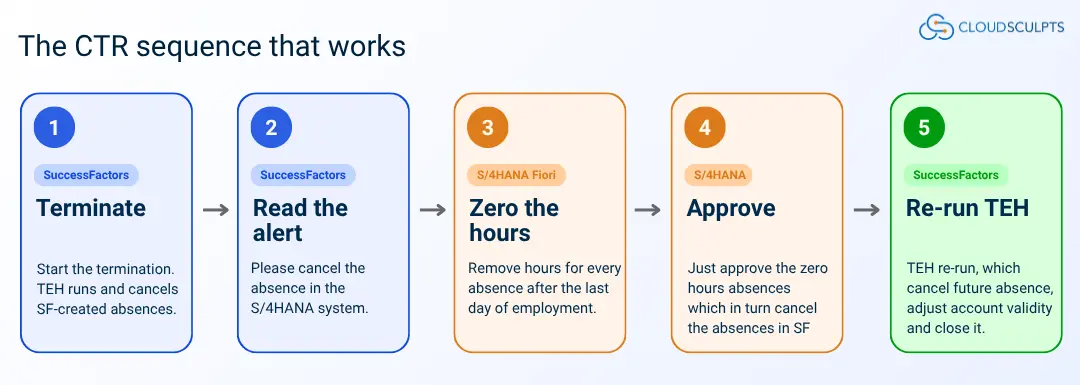
The one rule to remember: In CTR, SuccessFactors cannot cancel absences that were created in S/4HANA. Cancel those absences in S/4HANA first, let the approved timesheet replicate the cancellation to SuccessFactors, and then re-run Termination End Handling. It will then complete successfully.
What Termination End Handling does
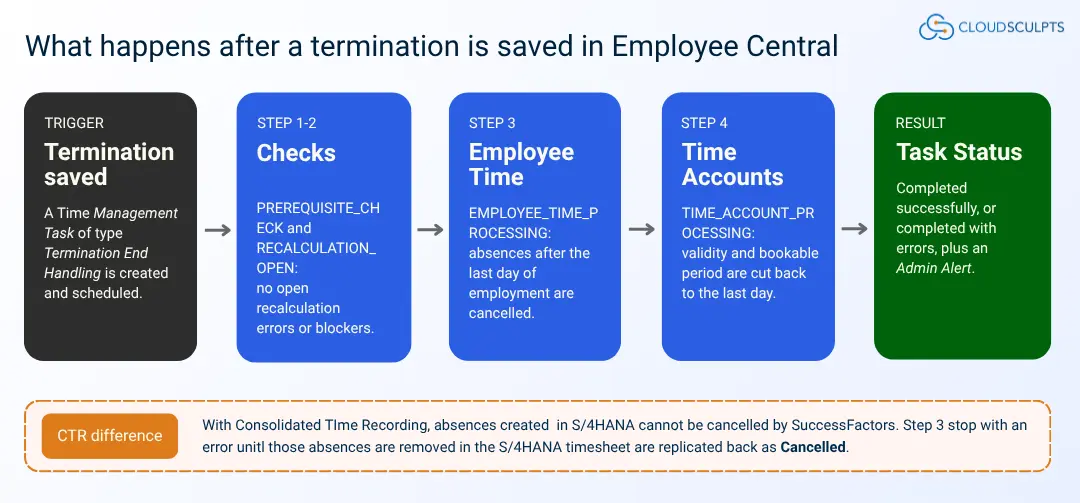
When an employee is terminated in Employee Central, the time data that falls after the last day of employment must be cleaned up. SAP SuccessFactors Termination End Handling (TEH) does this automatically. Saving the termination creates a Time Management Task of type Termination End Handling, which the system processes on its scheduled date.
The task runs through four processing steps. You will see these step names in the Termination End Handling admin alerts:
| Processing step | What the system does |
|---|---|
| PREREQUISITE_CHECK | Checks the termination can be processed, for example that the termination date has not changed since TEH last ran. |
| RECALCULATION_OPEN | Makes sure no recalculation event for the employee has finished with errors. |
| EMPLOYEE_TIME_PROCESSING | Cancels absences (employee time) that fall after the last day of employment. |
| TIME_ACCOUNT_PROCESSING | Shortens the validity and bookable period of time accounts to the last day of employment, or deletes accounts that start after it. |
Validation Status says “Success”, Pairing Status shows the record as paired correctly, right employee, right time event, right date, however issue exist in the timezone, which is not visible on the screen.
How CTR changes the process
With Consolidated Time Recording (CTR), employees record absences in the S/4HANA Fiori timesheet and the records are replicated to SuccessFactors. SuccessFactors does not own those records, so TEH cannot cancel them. The EMPLOYEE_TIME_PROCESSING step stops and raises this alert:
Alert text:
“The termination end handling process can’t cancel the employee time because it was created with consolidated time recording. Please cancel the absence in the S/4HANA system.”
Absences created directly in SuccessFactors are still cancelled by TEH automatically. Only the S/4HANA-originated absences need manual action. The sequence below is the one that works:
Example: Employee Termination with CTR
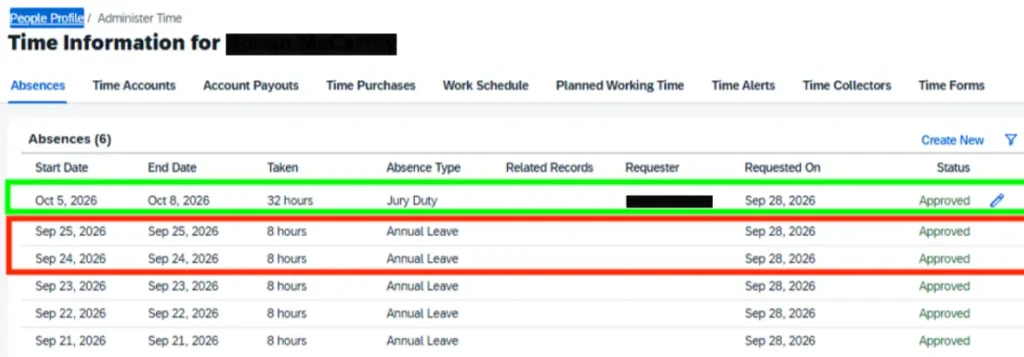
Sample Employee (Employee ID: 12345678) resigns with a last date of employment of 22 September 2026. Before the termination is saved, the employee has these absences
| Absence | Dates | Created in | Expected TEH outcome |
|---|---|---|---|
| Annual Leave | 21–22 Sep 2026 | S/4HANA (CTR) | Unchanged (on or before last day) |
| Annual Leave | 23–25 Sep 2026 | S/4HANA (CTR) | Cancel manually in S/4HANA |
| Jury Duty | 5–8 Oct 2026 | SuccessFactors | Cancelled automatically by TEH |
Step-by-Step: Complete Termination End Handling
Step 1 of 9: Review the employee’s absences and time accounts (SF).
Go to People Profile › Administer Time and open the Absences tab. Note every absence after the planned last day of employment and where it came from.
Open the Time Accounts tab. The Account Validity and Bookable Period are the fields TEH cuts back to the last day of employment.
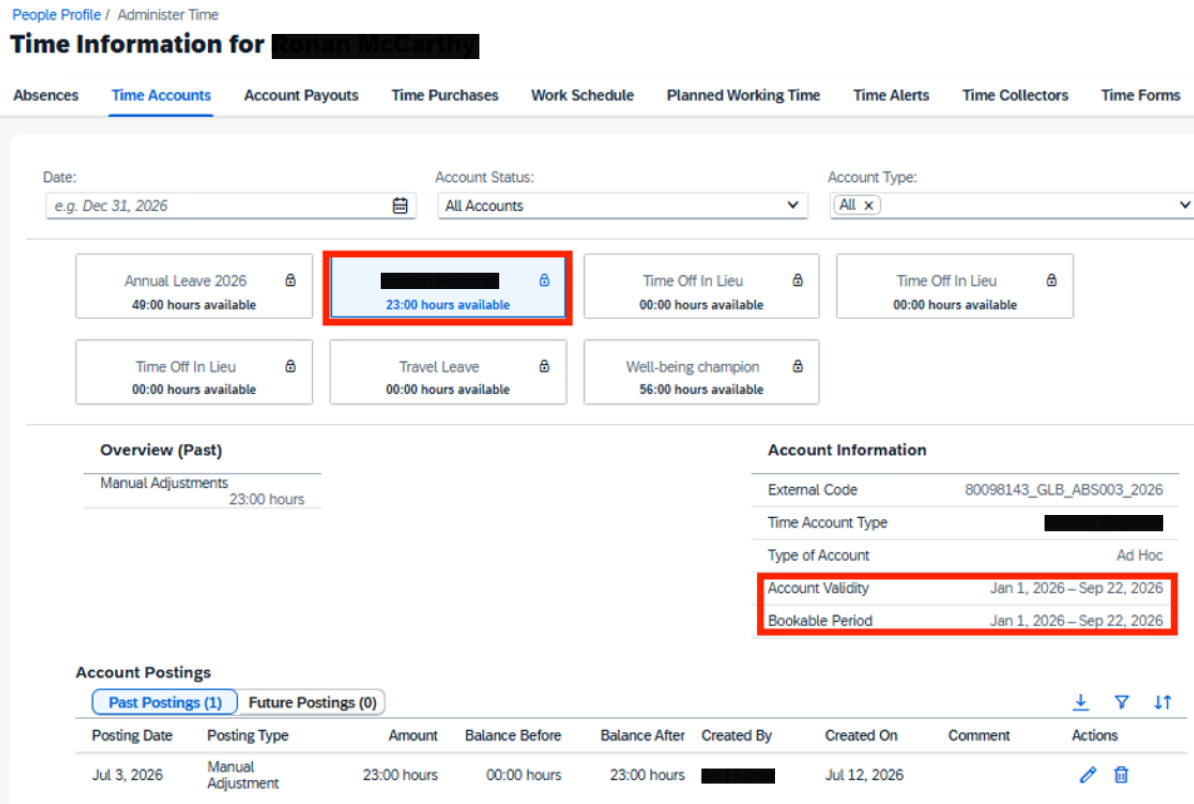
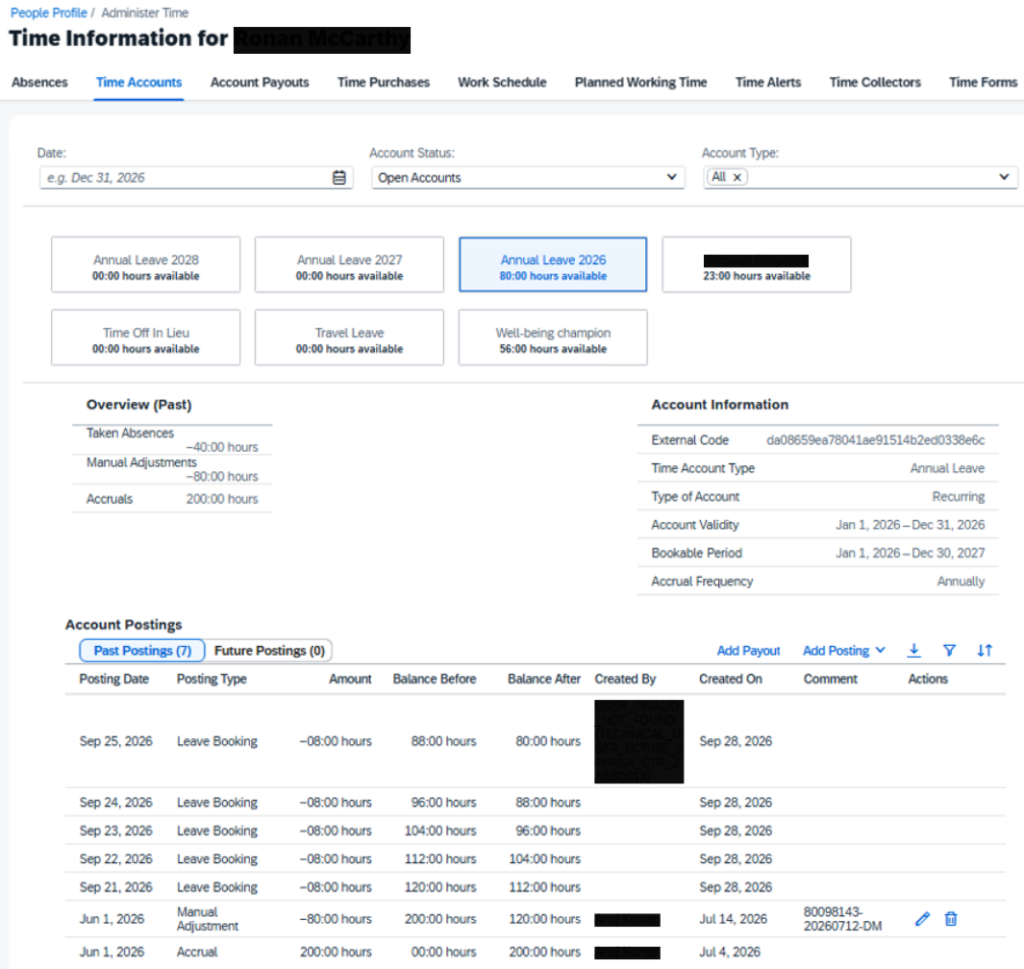
On the Annual Leave account, check the postings. A Created By value of the S/4HANA CTR technical user (TECHNICAL_USER_ECTIME_S4HANA_CTR…) shows the leave booking was replicated from S/4HANA.
Step 2 of 9: Terminate the employee (SF).
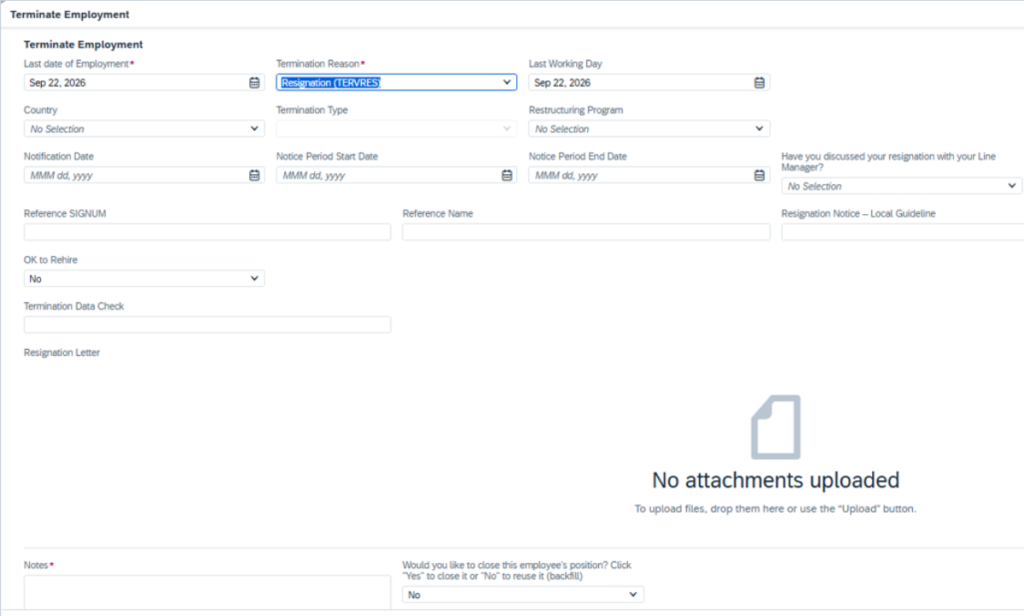
Open Terminate Employment, enter the Last Date of Employment (22 Sep 2026 in this example), the termination reason and the mandatory fields, then Save. This creates the Termination End Handling task.
Step 3 of 9: Check the Termination End Handling task (SF).
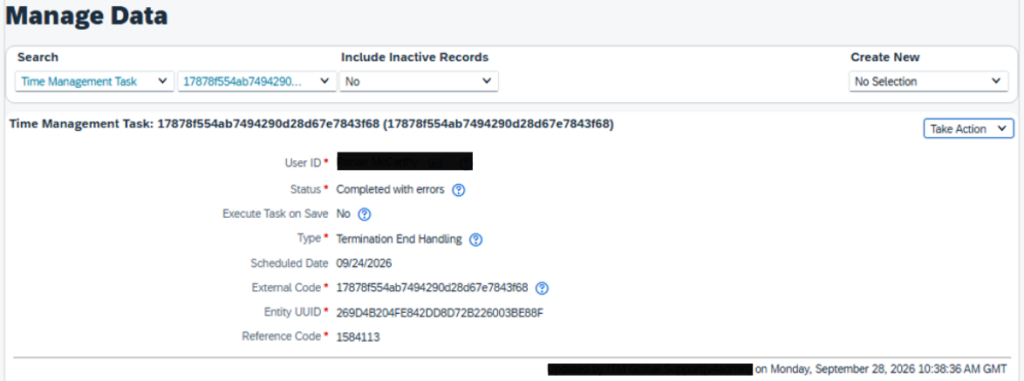
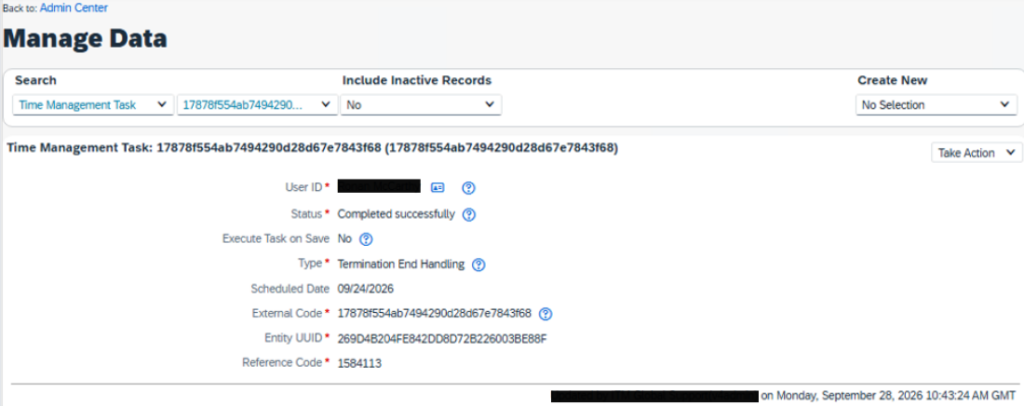
Go to Admin Center › Manage Data, search for Time Management Task and select the employee’s task. Because S/4HANA absences exist after the last day, the status is Completed with errors. This is expected in CTR.
Step 4 of 9: Read the Termination End Handling alert (SF).
Go to Admin Center › Admin Alerts and select the admin alert type Termination End Handling Alert under Time Management.
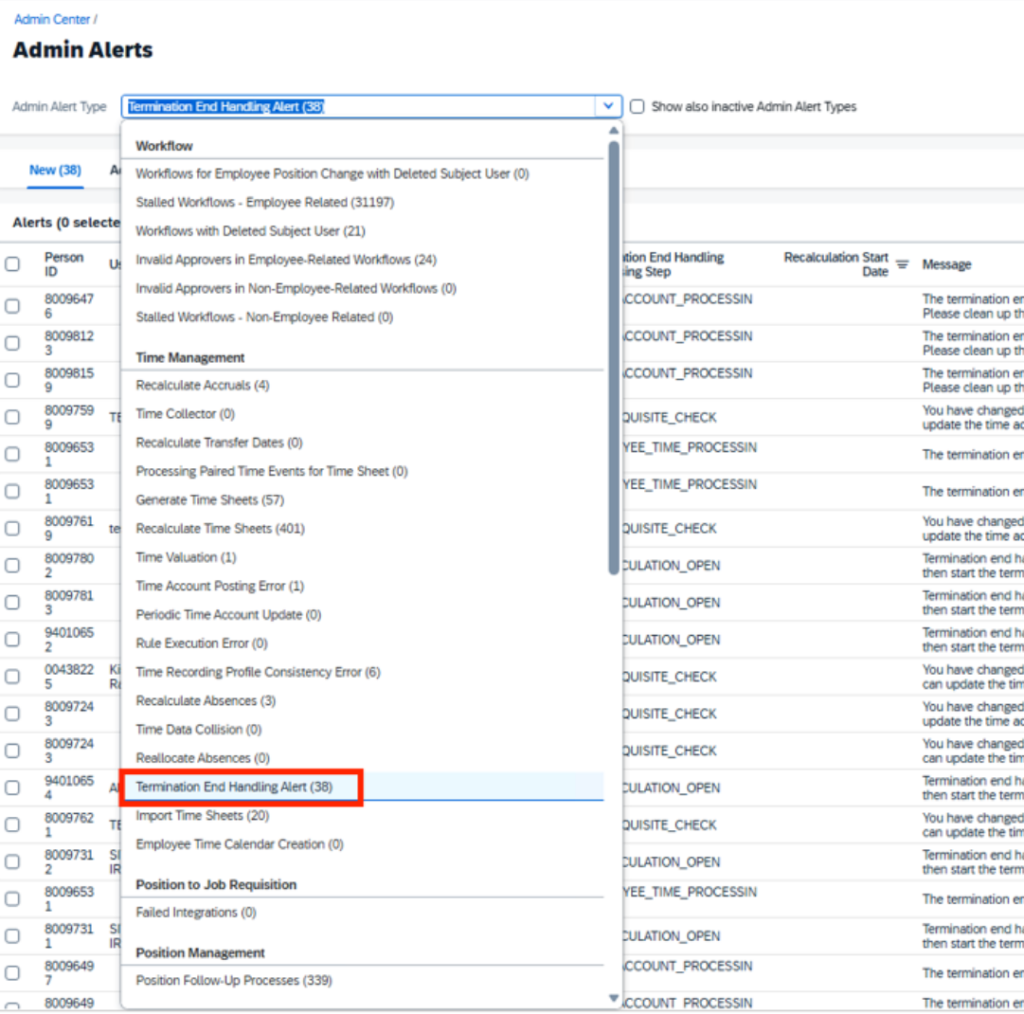
Filter for the employee. There is one alert per S/4HANA absence, at processing step EMPLOYEE_TIME_PROCESSING. The Employee Time External Code starts with CTR_, which confirms the record came from S/4HANA.


Step 5 of 9: Remove the hours in the S/4HANA timesheet (S4).
The employee, their manager or an administrator logs in to the Fiori timesheet in S/4HANA, opens the week of the termination and clicks Edit. Set the hours to 0 for every absence day after the last day of employment (23, 24 and 25 September here) and submit.

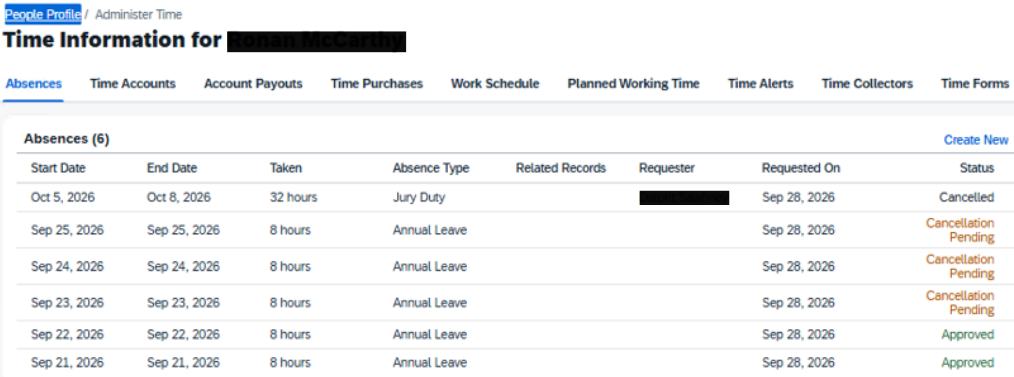
Step 6 of 9: Confirm “Cancellation Pending” in SuccessFactors (SF).
The change replicates to SuccessFactors and the absences show Cancellation Pending until the timesheet is approved in S/4HANA.
Step 7 of 9: Approve the timesheet in S/4HANA (S4).
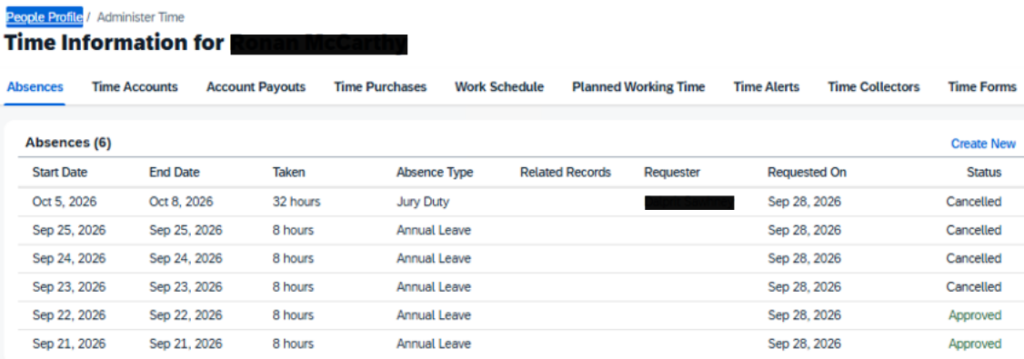
Once the timesheet is approved in S/4HANA, the absences replicate as Cancelled in SuccessFactors. Absences on or before the last day stay Approved.
Step 8 of 9: Re-run the Termination End Handling task (SF).
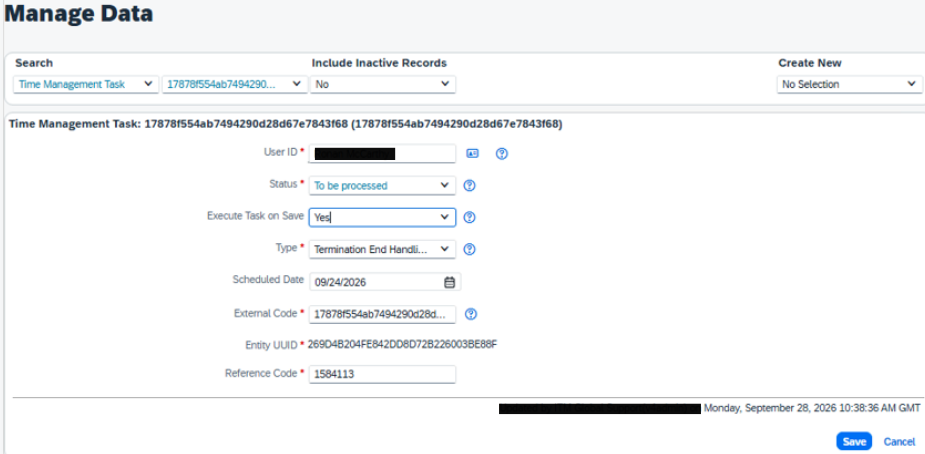
Go back to Admin Center › Manage Data and open the same Time Management Task. Choose Take Action › Make Correction and set:
- Status = To be processed
- Execute Task on Save = Yes
Then click Save.
Step 9 of 9: Confirm successful completion (SF).
Refresh the task. The status is now Completed successfully. Acknowledge the old Termination End Handling alerts for the employee in Admin Alerts.
Common alert messages
| Alert message (shortened) | Step | What to do |
|---|---|---|
| Can’t cancel the employee time because it was created with consolidated time recording | EMPLOYEE_TIME_PROCESSING | Zero the hours in the S/4HANA Fiori timesheet, approve, confirm Cancelled in SF, then re-run the task (Steps 5–8). |
| Can’t cancel the employee time because of a pending workflow | EMPLOYEE_TIME_PROCESSING | Complete or cancel the pending absence workflow, then re-run the task. |
| Recalculation event … finished with errors | RECALCULATION_OPEN | Clear the recalculation alert, restart the recalculation, then re-run the task |
| Can’t shorten the bookable period / can’t delete the time account: postings other than accrual or recalculation exist | TIME_ACCOUNT_PROCESSING | Clean up the manual postings after the termination date on the time account, then re-run the task. |
| Termination date changed to a past/future date after TEH already ran | PREREQUISITE_CHECK | TEH will not run again. Update the time accounts and absences manually, then acknowledge the alert. |
Checklist for CTR terminations
- List all absences after the last day of employment and note which are S/4HANA-created (Created By = CTR technical user, or external code starting with CTR_).
- Save the termination in Employee Central.
- Check the Termination End Handling task and the admin alerts.
- Zero the hours for those absences in the S/4HANA Fiori timesheet and get the timesheet approved.
- Confirm the absences show Cancelled in SuccessFactors.
- Re-run the task (Status = To be processed, Execute Task on Save = Yes).
- Confirm Completed successfully and acknowledge the old alerts.
Tip: do it in the right order.
If S/4HANA absences are cancelled before the termination is saved, there is nothing for TEH to block on, so it should complete successfully the first time without a re-run.
Need help with SAP SuccessFactors Time Management or CTR?
Making the right architectural decision is critical.
CloudSculpts brings hands-on experience from implementing CTR for global Telecommunications organisation spanning 100+ countries. This gives our team practical insight into designing Termination End Handling (TEH) and deploying CTR within complex, global SAP S/4HANA and SuccessFactors landscapes.
Our SAP SuccessFactors Time Management experts can help you:
- Troubleshoot Termination End Handling (TEH) issues
- Understand how TEH interacts with CTR and S/4HANA
- Resolve complex termination and time-recording scenarios
- Review SuccessFactors–CTR–S/4HANA integration and configuration
- Optimise existing Time Management and CTR implementations
Get practical guidance based on real-world SAP SuccessFactors experience.
About the Author:

Reni Jain
SAP SuccessFactors EC Consultant of CloudSculpts
Specializing in Employee Central (EC), Time Off, and Time Sheet Management. Focused on SAP configuration, time management processes, and effective HR technology solutions. Working on a similar SAP challenge? Let’s connect!